With the first month of 2015 already mostly behind us, you may have already filled your resolution list with more than enough ambitions for the coming year. But if you don’t have any design related goals, consider crossing out “eat more kale” and add one or two resolutions that nourish your creative self instead. Here are a few ideas:
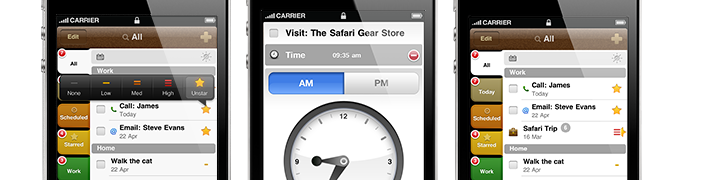
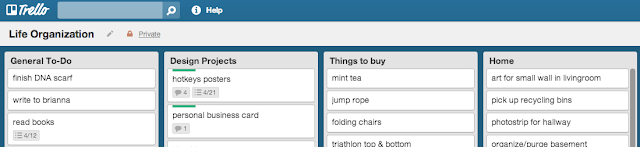
We all know how elusive getting into that perfect creative flow can be, so don’t let technical skills or messy organization get in your way. Here are some small things that can have a big impact on your efficiency:
Reading more is perpetually on my resolution list. No matter what the subject, I feel much more focused and aware in other areas of my life when I make reading a habit. Resolve to absorb some new information about designers and their process, new work that you won’t find circulating on the internet, or some practical information like freelance finances and logistics. Here are some design books that I’ve found interesting and helpful:
There are 100 ways to do the same thing when it comes to graphic design, and it’s extremely interesting to learn different designers’ processes. I’ve had a Skillshare membership for half a year now, and it’s certainly worth the cost. There is a huge variety of design and illustration related classes on there, as well as critical / creative thinking, marketing and other related fields. Here are a few of my favorites that I’ve taken so far:
It can be difficult to prioritize designing for yourself when you have so many other things on your to-do list (like eating or not eating kale.) But if you’ve been meaning to freshen up your personal branding or business cards, it may help to make it a resolution for yourself this year. Whether you’re actively looking for a job or not, it’s great to have business cards or a website that you’re proud to share whenever you meet a potential client, collaborator or even just a friend.
 1. Step up your technical skills.
We all know how elusive getting into that perfect creative flow can be, so don’t let technical skills or messy organization get in your way. Here are some small things that can have a big impact on your efficiency:
- Be diligent about creating character and paragraph styles for long documents
- Know and use keyboard shortcuts and hotkeys (shameless self-promotion: my hotkey reference posters can help with this one!)
- Try some new productivity or organization tools
- Develop a good file organization system (something I have to work on, any suggestions?)
2. Read a design book.
Reading more is perpetually on my resolution list. No matter what the subject, I feel much more focused and aware in other areas of my life when I make reading a habit. Resolve to absorb some new information about designers and their process, new work that you won’t find circulating on the internet, or some practical information like freelance finances and logistics. Here are some design books that I’ve found interesting and helpful:
- how to be a graphic designer without losing your soul by Adrian Shaughnessy
- The Designer’s Guide to Business and Careers by Peg Faimon
- Fingerprint: The Art of Using Hand-Made Elements in Graphic Design by Chen Design Associates
- Hand to Type : Scripts, Hand-Lettering and Calligraphy by J. Middendorp
 3. Learn something new, design-related or not.
There are 100 ways to do the same thing when it comes to graphic design, and it’s extremely interesting to learn different designers’ processes. I’ve had a Skillshare membership for half a year now, and it’s certainly worth the cost. There is a huge variety of design and illustration related classes on there, as well as critical / creative thinking, marketing and other related fields. Here are a few of my favorites that I’ve taken so far:
- Beyond the Logo: Crafting a Brand Identity by Courtney Eliseo
- Lettering Made Simple: Efficient Methods for Custom Type by Brandon Rike
- Logo Design Fundamentals: Simple and Solid Brand Marks by George Bokhua
- Type Design: Introduction to Effects in Illustrator by Evan Huwa
- Techniques for Lettering with Illustrator by Spencer Charles
- Context is Key: Social Media Strategy in a Noisy Online World by Gary Vaynerchuk
4. Refresh your personal brand or business cards.
It can be difficult to prioritize designing for yourself when you have so many other things on your to-do list (like eating or not eating kale.) But if you’ve been meaning to freshen up your personal branding or business cards, it may help to make it a resolution for yourself this year. Whether you’re actively looking for a job or not, it’s great to have business cards or a website that you’re proud to share whenever you meet a potential client, collaborator or even just a friend.
5. Start a rewarding personal project or endeavor.
No matter how much else you may have going on, it’s important to make time for projects that you truly feel personally and emotionally invested in. When your heart is in your work, it’s easier to put in extra time and energy, push your creative limits, and create work that truly connects and resonates with people. Also, you should be having at least a little bit of fun! I’ve found that techniques or styles I experiment with in personal projects end up being useful in my professional work as well. As Maya Angelou said, “You can’t use up creativity. The more you use, the more you have.”
CLICK TO TWEET
Let’s hear about them in the comments!